Car rental software built for New Zealand
Bookings, bonds, COF and RUC, handled before the customer walks in.
Windcave and Stripe, GST invoices to Xero, WoF and rego tracked. Built on two real rental fleets. Free to build, pay when you go live.
free to buildno card neededset up in an afternoon
Three pickups, a balance unpaid, a licence you have not seen, and a bond nobody held.
The old way is five browser tabs, an inbox and a whiteboard only you can read. One thing slips and it costs you the morning, or the bond. Glovebox has the day sorted before the first customer walks in.
Your customers see this
A real website. Yours, in an afternoon.
Every Glovebox account comes with a site on your own domain, live availability and bookings that land in the system. This is the Alpine theme, running live. Click anything.

From $99/mo. Free to build, pay when you go live.
1–5 vehicles $99 · 6–15 $169 · 16–30 $269 · 31+ $399, GST inclusive, founding price held for life
16 founding seats left
01 Abandoned cart recovery
Bookings you'd have lost, recovered while you sleep.
Someone prices a hire at 11pm, gets as far as payment and closes the tab. About an hour later Glovebox emails them a link straight back to the booking they started, dates and vehicle still there.
It is on for every booking from the day you start, so the follow up happens whether you are at the counter or asleep.
The cart as you see it the next morning: vehicle, dates, captured email, and what it is worth.
02 Self collection
Keys in 5 minutes.
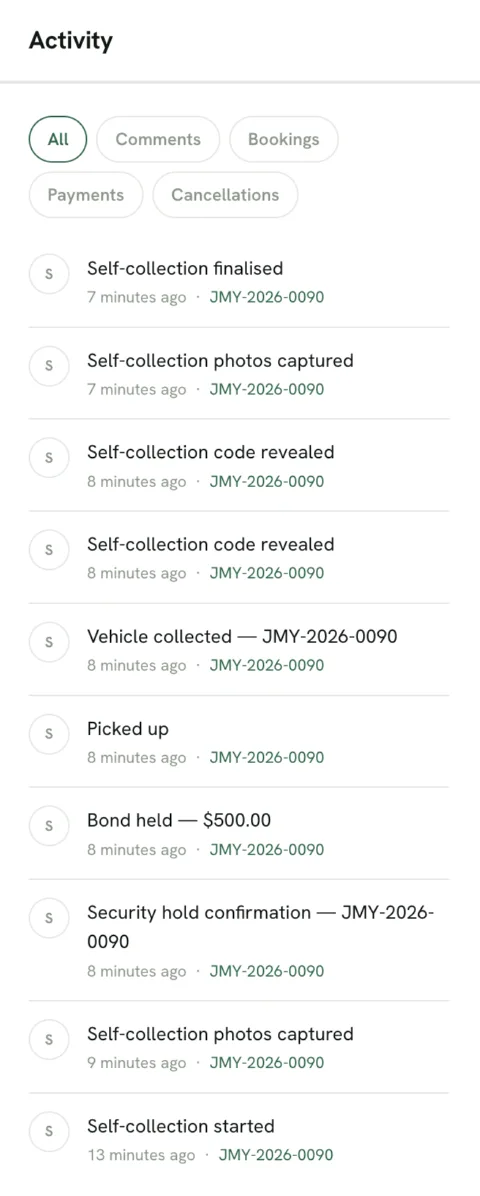
Your customer uploads their licence, signs the agreement on their phone and has the bond taken as a card hold before they turn up, and that hold releases itself after the vehicle comes back.
By the time they reach you the paperwork is done, so counter time collapses to a walk around and a handover.
03 Your own booking channel
A real website, not a widget bolted onto one.
Your site comes with Glovebox: your brand, live availability, and bookings that land in the system with no marketplace commission on top.
Happy with the site you have? Drop the booking widget into it instead and run both off the same availability and pricing.
What the customer sees
Coastline Hire Co
Book online
Live availability and pricing, straight off your own site.
04 Ask Claude about your bookings
Ask in plain English. Get the answer from your own bookings.
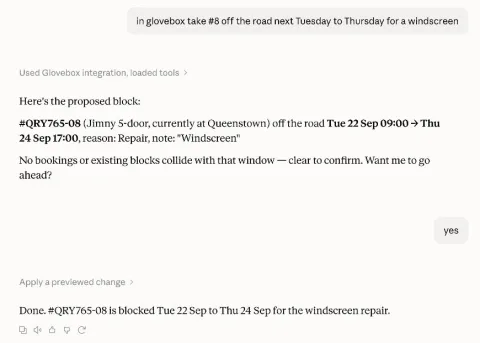
Connect Glovebox to Claude and ask it the way you would ask the office: "what have I got on today", "what do I need to do this week", "who still owes a balance", "is the 5-door free next week", "which cars are due a service". It reads your live bookings, revenue, fleet, servicing and RUC and answers in a sentence, not a report you have to open.
Then tell it what to change: "take #8 off the road Tuesday to Thursday for a windscreen", "log the service on #8 at 41,300 km", "close Christchurch on Boxing Day". Claude shows you exactly what would change and applies it only when you say yes.
Sign in with your Glovebox account, no keys to copy, and it only ever sees the workspaces you tick. Included with every plan.
Everything you'd expect
The table stakes, already done.
- GST tax invoices, synced to Xero
- RUC balances
- COF and rego expiry
- Windcave and Stripe
- Bond pre authorisations
- Digital agreements
- Fleet calendar
- Seasonal pricing
- Relocations
- Customer portal
- Multi location
- Reporting
All of it is in there from the day you sign up, on every plan. Look through the lot →
Pillar 2 · Know what each car earns
Utilisation, RevPAD and ADR, per vehicle
See how hard each vehicle works and what it earns per available day, so you price and buy on the numbers, not a hunch, per vehicle and across the whole fleet. And the day itself on one screen: who is picking up, who is overdue, what still needs a nudge.
- Utilisation, RevPAD and ADR per vehicle and fleet-wide.
- The whole day on one screen: pickups, returns and what needs chasing.
- A checkout guard that stops a non-compliant vehicle going out the gate.
The day at a glance: who is ready, who needs a nudge.
Why it exists
I built Glovebox because nothing out there did the whole job. Every system I tried made me do the work the software should do. I run Jimny Rentals and Dream Drives on it every day.
Switching
Moving off VEVS or a spreadsheet?
A turnkey VEVS migration and a CSV import wizard map your columns, build your fleet and keep your booking history, so you can move across mid-season without starting from zero. See how switching works → Moving from Rental Car Manager? →
Not switching yet? Two free tools, no account needed: the Revenue Stack calculator and the rental agreement generator.
Beyond cars
The same system already runs campervans and trailers
Campervans, bikes, scooters, trailers, kayaks and equipment all run on the same engine today: long hires and big bonds, licence capture, rego and warrant tracking, or none of that for a kayak. It is built to bend to how you work, not to make you fit it. Every kind of hire →
Free, no signup
Straight answers
The five questions operators ask
- Do customers stay on my website?
- Yes. The booking widget sits on the site you already run, or you take a full Glovebox Site on your own brand. Either way the availability, pricing and confirmations run in Glovebox behind it: the customer never leaves your website, and there is no marketplace commission.
- How do bonds actually work?
- The bond is held as a pre-authorisation on the customer's card, not a charge, and released automatically on return. Condition photos, odometer and fuel captured at handover sit on the booking, so if you do need to claim against the bond there is an evidence trail behind it.
- Does it handle GST and RUC properly?
- Yes. Prices show GST inclusive, tax invoices sync to Xero, and RUC sits in the model where a local operator expects it, with low-km warnings, rather than bolted on by a US manual. GST is 15% and native, not a setting you configure.
- Can I leave VEVS mid-season?
- Yes. The VEVS migration and CSV import wizard map your columns, build your fleet and keep your booking history, so you can move across without starting from zero or waiting for a quiet month.
- What happens after the 90 days?
- You pick the plan that matches your fleet size and carry on with full access, no credit card is taken to start the trial. Founding pricing, if you took it, is held for the life of the account.
Next step
Start free, set up in an afternoon
Self-serve signup and a guided setup, with a demo booking to test the whole flow before you go live.