Claude connector
Just ask Claude
Connect Glovebox to Claude and ask the questions you would otherwise dig for: what is picking up this week, who still owes a balance, what last month made, which 5-door is free over Labour weekend, where car #8 is right now, what needs a service this month. And when something needs changing, Claude proposes it, shows you exactly what would change, and applies it only when you say yes.
Listed in the Claude connectors directory. Sign in with your Glovebox account, no API keys. Read-only until you say otherwise. Owners only.
Ask it anything
The questions you ask the office, answered from your live workspace
Claude reads straight from Glovebox at the moment you ask, so the answer is the same one your dashboard would give, with times in your timezone and money in your currency including GST. Nothing is copied or cached anywhere else.
Bookings
Pickups and returns for any window, who is on hire, who is overdue, and which bookings still owe a balance.
"What is picking up this week and who hasn't paid?"
Revenue
Booked and collected for a period, month by month, with utilisation and how much of it came from returning customers.
"How did August compare with July?"
Availability
Which vehicles, in which groups, are free for a set of dates at each branch, with the same rules the booking widget applies.
"Is a 5-door free in Queenstown over Labour weekend?"
Fleet
Every vehicle by fleet code and plate, where it is now, whether it is on hire, blocked or idle, and what it is booked for next.
"Where is #8 and when is it next out?"
Pricing suggestions
Demand-based suggestions for each vehicle group, held inside the floor and ceiling you set on the demand pricing page.
"Where should the Jimny rate sit for the school holidays?"
This week
The week by day: every pickup, return and transfer with what still needs fixing, the dashboard's attention list, and the fleet items falling due.
"What do I need to do this week?"
Servicing, WoF and RUC
Each vehicle's WoF or CoF, rego and insurance dates, RUC balance, service schedules with what is due by km and date, open jobs, and what has been done.
"Which cars need a service this month?"
Workspace and locations
Your branches, opening days and closed dates, your workspace settings, and the exact embed snippet for your booking widget.
"Give me the widget code for the new site."
Tell it what to change
Four kinds of change. Every one shown to you first.
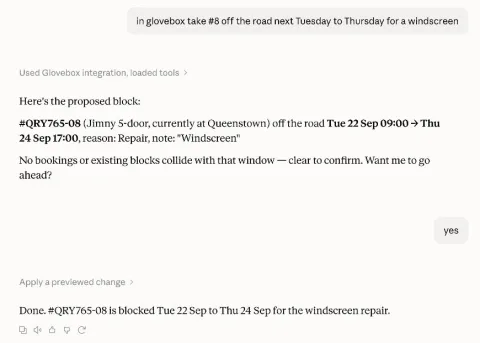
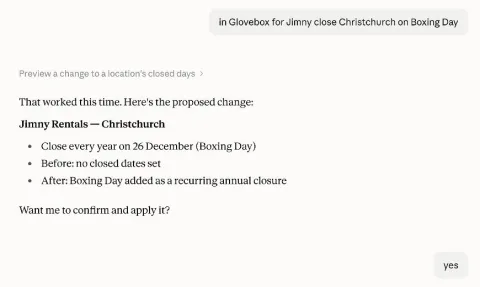
If you allow changes at sign-in, Claude can propose four kinds of thing. Settings and rates: close a branch on certain days, set the minimum booking lead time, add a seasonal rate, adjust a group's rate inside its band, take a vehicle off the road. Setup, for a new workspace: business details, a location, a vehicle group with its daily rate, vehicles in batches, deposit and balance rules, a cancellation policy. Fleet upkeep: record an odometer reading, top up RUC, log a service or repair as done so the next one rolls forward, or book a vehicle in for work. Your Glovebox website: pick a theme and brand colours, have it write the home page hero, the about page and the FAQ in your words from what you tell it, set contact details and opening hours, arrange the menu, and publish once you have looked at the preview.
Each proposal comes back as a preview: the before, the after, and any warnings, such as a rate it would sit alongside or a confirmed booking a block would collide with. Nothing is saved until you say yes in the conversation. A proposal can be applied once and expires after fifteen minutes, so an old "yes" cannot be reused.
- Never touched: bookings, customers, payments, existing rates, existing blocks, past service history, your logo and photos.
- Never deleted: anything, apart from a menu item you leave out when the menu is rewritten. Changes add settings, rates, blocks, readings and jobs, and rewrite the words on your site.
- One workspace at a time: with several connected, Claude must name which one before it proposes a change.
Your workspace, your rules
It cannot do anything you have not allowed
Only a workspace owner can connect Claude, and only to the workspaces they own. At sign-in you choose read-only or allow changes; read-only is the default. Each connection becomes a named token under Settings, Claude connector, labelled with the date you signed in, and you can revoke any one of them on its own.
Switch the module off and every connection is cut at once. Every change Claude applies is recorded on your workspace timeline with the proposal it came from, so you can always see what was asked, what was shown, and what was done.
Glovebox keeps nothing from your conversations. Each request from Claude carries only the question it needs answered, and the answer goes back to Claude and nowhere else.
Setup
Connected in three steps, no keys to copy
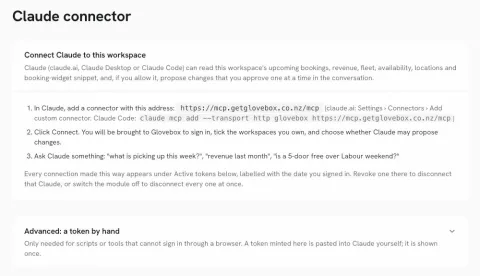
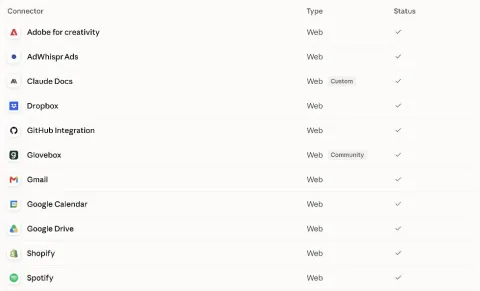
- Find Glovebox in Claude. Open the Claude connectors directory, or add a custom connector with the address shown on your Settings page. Claude Desktop and Claude Code work the same way.
- Sign in with Glovebox. Click Connect and you are brought to Glovebox to sign in with your normal account. Tick the workspaces you own and choose whether Claude may propose changes. Several businesses can share one connection.
- Ask. "What is picking up this week?", "revenue last month", "is a 5-door free over Labour weekend?" You are back in Claude with the workspace connected.
The full walkthrough, with what each tool can see, is in the setup guide.
Straight about what it is
A window into your workspace, not a new pair of hands
The connector is deliberately narrow. It answers questions from your data, it proposes a handful of small, reversible settings and fleet records, and it can write and restyle your Glovebox website within the same choices Site Studio gives you. It does not take bookings, move dates, swap vehicles, charge cards, email customers or rewrite service history, and we would rather say so here than have you find out mid-conversation. As operators ask for more, we add tools one at a time, each with the same preview-and-confirm rule.
Claude is made by Anthropic; Glovebox is not affiliated with Anthropic. What you ask Claude, and what it answers, is handled by Anthropic under your Claude account's terms. Glovebox only ever sees the individual question a tool is asked and answers it.
Questions
The Claude connector, answered
What can Claude read once it is connected?
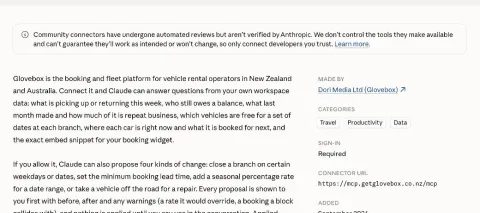
Your workspace details, your locations, upcoming and recent bookings with their balances, revenue for a period, which vehicles are free for a set of dates at each branch, where each vehicle is now and what it is booked for next, the week ahead with the dashboard's attention list, every vehicle's WoF or CoF, rego, insurance and RUC position with its service schedules and open jobs, what has been done to a vehicle, demand-based pricing suggestions inside the rate bands you have set, your Glovebox website as Site Studio sees it (theme, brand colours, every page's words, contact details, menu and whether it is live), and the embed snippet for your booking widget. Nothing outside your own workspaces, and only the workspaces you ticked at sign-in.
Can Claude create, move or cancel bookings?
No. Bookings, customers and money are read-only. What Claude can propose falls into four groups: settings and rates (closed days, lead time, seasonal rates, a rate adjustment inside a group's band, an off-road block), setup for a new workspace (business details, locations, vehicle groups, vehicles, deposit and cancellation rules), fleet upkeep (an odometer reading, a RUC top-up, a service or repair logged as done, a job booked in), and your Glovebox website (the theme and brand colours, the words on the home, fleet, about, FAQ and terms pages, contact details and opening hours, the menu, and publishing). It never edits or deletes an existing rate, block, booking, reading or service record. A Glovebox website has no draft copy, so a website change you confirm while the site is live is public straight away, exactly as a save in Site Studio is.
Does anything get changed without me?
No. Every change is two steps. Claude first shows you the proposal with the before, the after and any warnings, such as a booking a block would collide with. It is applied only if you say yes in the conversation, and each proposal can be applied once and expires after fifteen minutes.
Who can connect Claude?
Workspace owners. When you sign in from Claude, Glovebox lists only the workspaces you own, and you tick the ones to connect and whether Claude may propose changes. Read-only is the default.
How do I disconnect it?
Every connection appears under Settings, Claude connector, labelled with the date you signed in. Revoke one there to disconnect that Claude, or switch the module off to disconnect every connection at once.
What does it cost, and which Claude do I need?
Glovebox does not charge extra for the connector. Claude is Anthropic's product and needs its own account; the connector works in claude.ai, Claude Desktop and Claude Code on plans that support connectors.
Glovebox is listed at claude.ai/directory/glovebox. The step-by-step guide is at Use Claude with your workspace.